

A USB-C hub is four chips and a socket. A portable monitor is a laptop panel without the laptop. Neither is complicated, and neither justifies what the big brands charge — which is why this is one of the better categories to buy direct.
It is also the category with the most specifications that quietly do not do what you assume. One number on a hub listing decides whether your external screen runs smoothly or judders, and most people never look at it. This page lists what is discounted now, then explains what to check.
The shortlist right now
Live prices, deepest cut first. The table refreshes automatically.
| # | Product | Price | Was | Off |
|---|---|---|---|---|
| 1 | ZEUSLAP 15.6inch touch panel portable monitor | $152 | $379 | -60% |
| 2 | KEJI 15 in 1 USB Type C… | $33.83 | $58.32 | -42% |
| 3 | ORICO USB C HUB Type C to… | $20.87 | $35.37 | -41% |
| 4 | GAOMON M106K PRO 10'' Graphics Drawing Tablet | $77.99 | $120 | -35% |
| 5 | iMice Hub USB 3.0 Hub | $11.91 | $18.32 | -35% |
| 6 | UGREEN USB HUB C HUB HDMI Adapter… | $14.07 | $21.32 | -34% |
| 7 | Baseus 1000A Car Jump Starter Power Bank… | $55.99 | $79.99 | -30% |
| 8 | Vention Thunderbolt 3 USB Hub Type C | $19.99 | $28.56 | -30% |
| 9 | GAOMON S620 Graphic Tablet | $36.60 | $46.99 | -22% |
| 10 | GAOMON M10K PRO 10 x 6.25 Inches… | $75.99 | $94.99 | -20% |
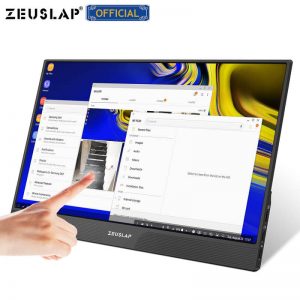
ZEUSLAP 15.6inch touch panel portable monitor
The deepest cut on this page: $227 off the seller's list price.
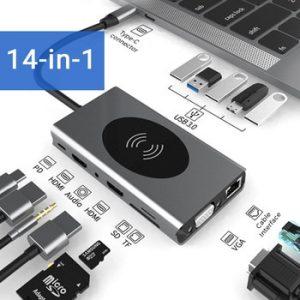
KEJI 15 in 1 USB Type C HUB With HDMI
$24.49 off, a 42% cut from the seller's list price.
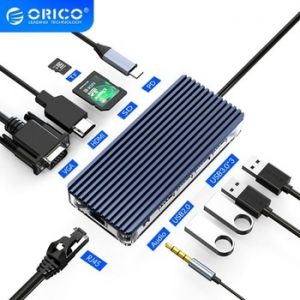
ORICO USB C HUB Type C to Multi USB
$14.50 off, a 41% cut from the seller's list price.
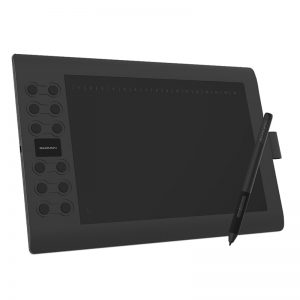
GAOMON M106K PRO 10'' Graphics Drawing Tablet
$42.00 off, a 35% cut from the seller's list price.
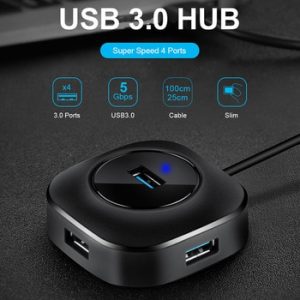
iMice Hub USB 3.0 Hub
The cheapest way in here, at $11.91.
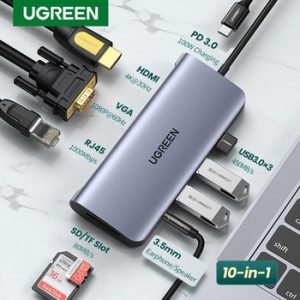
UGREEN USB HUB C HUB HDMI Adapter 10 in 1
$7.25 off, a 34% cut from the seller's list price.

Baseus 1000A Car Jump Starter Power Bank 12000mAh Portable Battery Station For 3.5L/6L Car Emergency Booster Starting Device
$24.00 off, a 30% cut from the seller's list price.
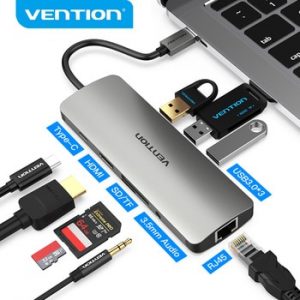
Vention Thunderbolt 3 USB Hub Type C
$8.57 off, a 30% cut from the seller's list price.
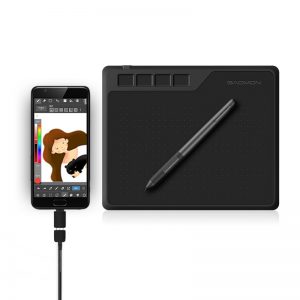
GAOMON S620 Graphic Tablet
$10.39 off, a 22% cut from the seller's list price.
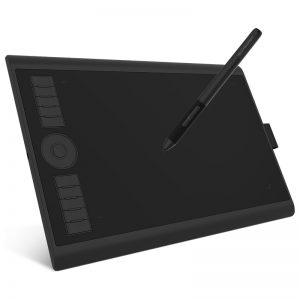
GAOMON M10K PRO 10 x 6.25 Inches Graphic Tablet
$19.00 off, a 20% cut from the seller's list price.
Keep reading
Prices are the ones recorded when this page last refreshed and can change at any time. Ali Best is an independent site and is not operated by any marketplace; buying through a link here may earn us a commission at no extra cost to you.
⚠️ USB-C hubs: the 4K at 30Hz trap
This is the single most common disappointment in the category, and it is always in the small print.
A hub with HDMI 1.4 can output 4K — but only at 30Hz. Thirty frames a second makes the mouse pointer visibly drag across the screen. It is fine for a static dashboard and horrible for everyday work. For a smooth 4K you need HDMI 2.0, which gives 60Hz.
Before you order, find one of these on the listing: “4K@60Hz” or “HDMI 2.0”. If it only says “supports 4K”, assume 30Hz, because a seller who had 60Hz would say so. At 1080p none of this matters — every hub does 1080p at 60Hz.
The other three things to check on a hub
- Power delivery wattage. A hub that charges your laptop through itself always loses some watts to the hub. A “100W PD” port typically delivers 85 to 87W to the laptop. If your laptop needs 65W you are fine; if it needs 100W it will charge slowly or not at all while the hub is loaded.
- Does your laptop’s port carry video at all? A USB-C socket does not automatically output a screen — it needs DP Alt Mode. Most modern laptops have it; many cheap laptops and some tablets do not, and no hub can add it. Search your laptop model plus “DP Alt Mode” before buying anything that promises a second screen.
- Heat. Aluminium-bodied hubs run cooler than plastic ones, and a hot hub drops connections. For a hub that stays plugged in all day, the metal one is worth the extra few dollars.
Portable monitors: the one-cable question
The appeal is a single USB-C cable carrying picture and power. Whether that works depends entirely on your laptop, not on the monitor:
- Laptop with DP Alt Mode and enough power — one cable, done.
- Laptop with DP Alt Mode but a weak port — picture over USB-C, power from a separate charger. Two cables, still fine.
- No DP Alt Mode — you need the mini-HDMI input instead, plus USB for power. Check the monitor has an HDMI input before you rely on this.
Resolution honesty: at 15.6 inches, 1080p is sharp enough for everything. A 4K portable monitor at that size costs much more, drains more battery and the difference is barely visible at arm’s length. The money is better spent on a brighter panel — anything under 250 nits is unusable near a window.
Drawing tablets: it is all about the driver
The hardware on budget graphics tablets is genuinely good — the pen is usually battery-free with 8192 pressure levels, the same figure the expensive ones quote. What varies is the driver.
Before buying, check the maker has a driver for your operating system and that it was updated recently. A tablet with no current macOS driver is a plastic rectangle on a Mac, and no refund covers “I did not check”.
The things that actually go wrong
- The hub disconnects every few minutes. Usually heat or an underpowered port. Try it with the laptop charger plugged into the hub’s PD port — many hubs are unstable when running on bus power alone.
- Ethernet is slower than expected. A gigabit port on a USB 2.0 hub cannot reach gigabit speeds. Check the hub says USB 3.0 or 3.1 for the data side.
- The second screen flickers. Almost always the cable, not the hub. The short cable in the box is often the weakest part; a known-good one fixes most cases.
- Jump starters and power banks. The quoted capacity is the cell rating, not what reaches your device — expect roughly 60 to 70 per cent after conversion losses. A “12000mAh” unit delivers about 8000mAh of usable charge.
- Shipping. Anything with a battery ships by a restricted route and takes longer. Read the shipping note before you count on a date.
Frequently asked questions
Will a hub work with my MacBook?
Yes for data and charging. For screens, Apple’s own silicon limits how many external displays some models support, no matter what the hub offers — check your Mac model’s display limit first.
Can I daisy-chain two monitors from one hub?
Only with DisplayPort MST, which most laptops and most cheap hubs do not support. Assume one external screen unless the listing explicitly says otherwise.
Is a 1080p portable monitor enough?
At 15.6 inches, yes, comfortably. Put the money into brightness instead.
How long does delivery take?
Two to five weeks on free standard shipping to most countries, three to seven days on paid express from a local warehouse.
The short version
For a hub: insist on HDMI 2.0 if you want 4K, pick aluminium over plastic, and confirm your laptop has DP Alt Mode before you count on a second screen at all. For a portable monitor: 1080p is plenty at this size, brightness matters more than pixels. For a drawing tablet: check the driver supports your operating system today, not two years ago.